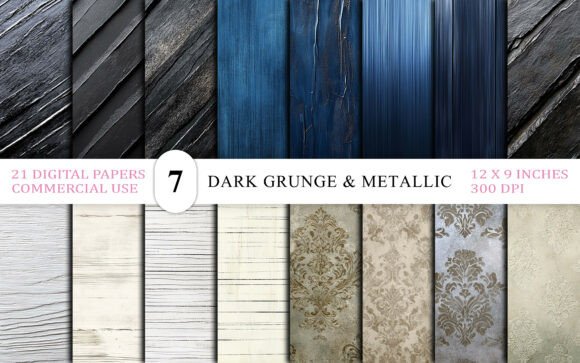
Dark Grunge Metallic Texture Bundle: Elevate Your Designs with Industrial Elegance
The Dark Grunge Metallic Texture Bundle offers a striking collection of 21 high-quality digital backgrounds that combine the edgy aesthetics of grunge with the refined depth of metallic textures. Whether you're a graphic designer, marketer, or hobbyist creator, this bundle provides a versatile toolkit for crafting bold, moody visuals that stand out. Each file is sized at 3600×2700 pixels—ideal for print and digital use—and comes in JPG format, ready for immediate application in your projects.
Why This Bundle Appeals to a Wide Range of Users
With its mix of rusty wall surfaces, distressed digital papers, and industrial scrapbook bases, the Dark Grunge Metallic Texture Bundle is perfect for those aiming to add depth and character to branding materials, editorial layouts, album covers, or themed presentations. It's especially popular among designers working in gothic, baroque, or vintage-inspired aesthetics. The seamless overlays and abstract textures also make it a go-to resource for web elements, social media templates, and product mockups.
Common Mistakes When Choosing and Using Grunge Texture Bundles
While the Dark Grunge Metallic Texture Bundle is packed with potential, users often overlook key details that can impact their results. Here are some common missteps and how to avoid them:
1. Not Checking Resolution and Scale Before Use
One of the most frequent errors is assuming that all high-resolution texture packs are suitable for every project. Although this bundle offers 3600×2700 px files at 300 DPI—perfect for print—some users attempt to stretch or upscale the textures beyond their intended scope, leading to pixelation or blurry edges.
Better approach: Always preview textures at 100% zoom in your design software before finalizing. If you're creating large-format prints or banners, ensure the texture dimensions align with your layout requirements to maintain sharpness and clarity.
2. Overlooking File Format Limitations
This bundle includes JPG files, which are excellent for quick integration and broad compatibility. However, JPGs don’t support transparency, which can limit their use in layered design projects where elements need to blend seamlessly over other layers or backgrounds.
Better approach: If your project requires transparent overlays—like for web buttons or layered illustrations—consider requesting or sourcing a PNG version of similar textures. Alternatively, use blending modes in your design software to simulate transparency effects with JPG files.
3. Mismatching Texture Style with Project Tone
It’s easy to get drawn in by the dramatic visuals of the Dark Grunge Metallic Texture Bundle and apply it universally. However, not every project benefits from a gritty, industrial look. For example, using these textures in minimalist branding or clean editorial designs can clash with the intended aesthetic and confuse your audience.
Better approach: Match the texture's mood with your project’s purpose. Use the Dark Grunge Metallic Texture Bundle for edgy campaigns, album art, or urban-themed promotions. For softer or more professional materials, opt for subtler textures or neutral overlays.
4. Failing to Test on Different Backgrounds
Grunge textures often include dark tones, rusted elements, and metallic sheens. While visually compelling, these can become less effective or even distracting when layered over certain colors or images without testing.
Better approach: Always preview your texture over different background colors and images in your design tool. Adjust layer opacity, blending modes (like Multiply or Overlay), and contrast to ensure the texture enhances rather than overwhelms the composition.
5. Ignoring Licensing Details
Though this bundle is labeled for commercial use, some users may not fully understand the nuances of the license. For instance, while you can use the textures in client projects or products, you typically cannot resell or redistribute the files themselves.
Better approach: Review the licensing terms included with the Dark Grunge Metallic Texture Bundle before use. If you're unsure about usage rights for a specific purpose—such as selling merchandise with the textures—reach out to the seller for clarification.
What to Check Before Downloading or Purchasing
To make the most of your investment in the Dark Grunge Metallic Texture Bundle, consider the following checklist:
- Texture variety: Does the bundle include a mix of metallic, rusted, and fabric-style textures? This ensures flexibility across different design types.
- File format compatibility: Are the files compatible with your design software? JPGs are widely supported, but check if you need additional formats like PNG or PSD for advanced editing.
- Resolution and DPI: Confirm that the textures meet your output needs—300 DPI is standard for print, while 72 DPI may suffice for web use.
- License scope: Understand whether the license allows for personal, commercial, or extended use. Some premium texture packs offer different tiers based on usage rights.
- Customer support: Is the seller responsive and helpful? This can be crucial if you encounter download issues or have questions about implementation.
Maximizing the Value of Your Texture Bundle
The Dark Grunge Metallic Texture Bundle is more than a set of background images—it’s a design enhancer that can elevate your creative output when used thoughtfully. To get the most from it:
- Experiment with blending modes: Try different blending options in Photoshop or Illustrator to create depth, metallic sheens, or subtle overlays.
- Combine with clean typography: Balance the gritty texture with legible, minimalist fonts to ensure readability and visual contrast.
- Use in themed collections: These textures work exceptionally well in themed design kits, such as gothic wedding invitations, industrial packaging, or dark-themed branding.
- Organize your files: Keep your texture folders well-structured so you can quickly find the right one for each project. Naming files by texture type (e.g., "rusty metal," "baroque overlay") helps with efficiency.
Conclusion
The Dark Grunge Metallic Texture Bundle offers a powerful blend of industrial edge and refined elegance, making it a valuable asset for designers and creators across industries. By avoiding common pitfalls—like ignoring resolution, format, or licensing details—you can ensure your designs not only look professional but also perform well across media. Whether you're crafting a bold brand identity, a dramatic editorial layout, or a textured digital illustration, this bundle gives you the tools to make a strong visual impact—without the guesswork.